Independent insurance agencies often start renewal tracking in Excel.
That makes sense. It is flexible, familiar, and easy to update. But as the book grows, it becomes harder to see which policies are coming up, which accounts have been contacted, and which renewals deserve immediate attention.
This post includes a free insurance renewal tracking spreadsheet template you can use today, along with a practical explanation of when spreadsheets work well and when a dedicated renewal workflow becomes the better fit.
Download the Template
Download the free insurance renewal tracking spreadsheet template
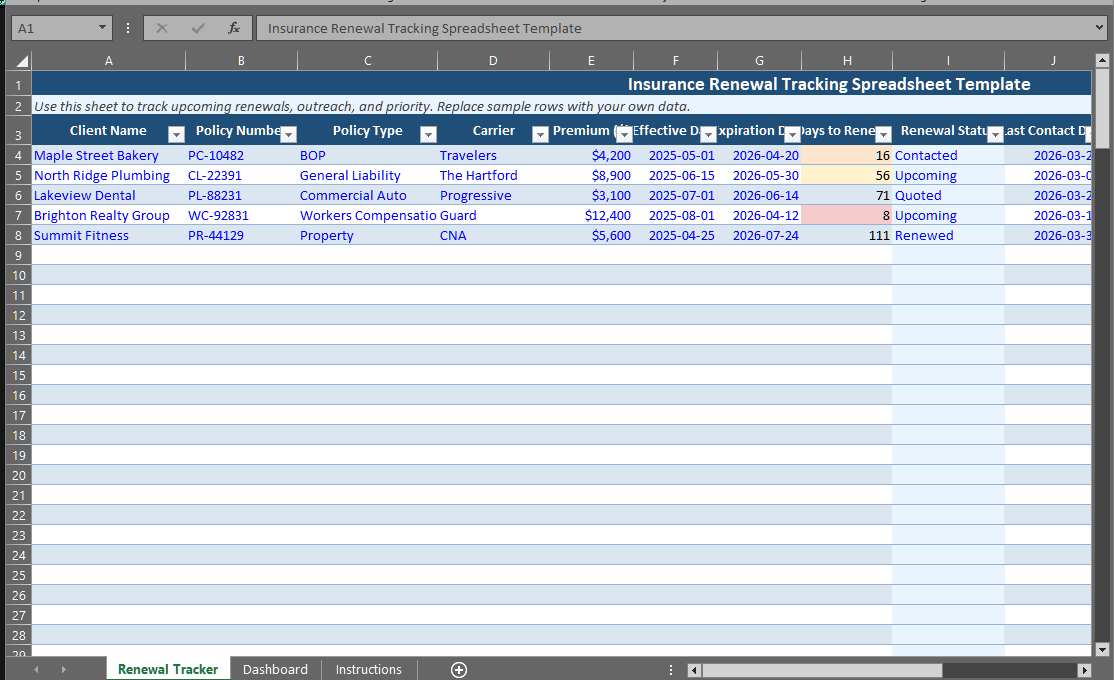 The file includes a working renewal tracker and a simple dashboard for smaller agencies that need a structured starting point without buying software first.
Who This Template Is For
This template is designed for:
- Solo agents
- Small independent agencies
- Agencies with 1 to 10 users
- Teams tracking renewals in Excel or exported AMS reports
It is especially useful if your current workflow looks like this:
- Run an expiration report.
- Export the data to CSV.
- Paste it into Excel.
- Add contact notes manually.
- Review upcoming renewals each week.
That process works for a while. It is also exactly where many agencies start to feel friction.
What Is Included in the Spreadsheet
The renewal tracker includes fields for the policy information and follow-up work most agencies need:
- Client name
- Policy number
- Policy type
- Carrier
- Annual premium
- Effective date
- Expiration date
- Days to renewal
- Renewal status
- Last contact date
- Days since contact
- Producer
- Notes
- Priority score
The dashboard sheet summarizes:
- Policies renewing in 30 days
- Premium renewing in 30 days
- High-priority renewals
- Renewed policies
- Lost policies
- Status counts
That gives a small agency a quick operational view without needing a full AMS workflow.
How the Template Works
The spreadsheet is built to be practical, not overengineered.
Days to Renewal
The template calculates the number of days until expiration so you can sort the book by urgency instead of scanning dates manually.
Days Since Contact
It also tracks how long it has been since someone reached out to the account. That matters because a renewal that has gone quiet is more likely to get worked late or lost.
Priority Score
The template includes a simple priority score based on:
- How soon the renewal expires
- Whether the premium is larger
- Whether contact activity is stale
It is intentionally simple. The goal is to help you identify which renewals deserve attention first.
How to Use the Template
1. Export Your Current Renewal List
Export policy data from your AMS or current spreadsheet. That may include Applied Epic, AMS360, HawkSoft, or any CSV export from your current system.
2. Paste Your Policy List into the Renewal Tracker Sheet
Replace the sample rows with your own policies.
3. Update Renewal Status as Work Progresses
Use the built-in status options:
- Upcoming
- Contacted
- Quoted
- Renewed
- Lost
4. Enter the Last Contact Date After Each Touch
This keeps the tracker useful. A renewal sheet becomes much more valuable when it reflects actual outreach, not just expiration dates.
Why Agencies Use Spreadsheets for Renewal Tracking
There is a reason Excel remains common in independent agencies. Spreadsheets are easy to start, inexpensive, flexible, and familiar to almost everyone.
For a small book, that may be enough. The problem is not that spreadsheets are bad. The problem is that they become harder to trust as renewal volume grows.
Where Renewal Spreadsheets Start to Break Down
The spreadsheet is useful. It also has limits.
No Real Workflow Visibility
A spreadsheet shows rows. It does not naturally show movement through a renewal process.
Team Coordination Gets Messy
Once multiple people update the same file, notes and statuses become inconsistent.
Prioritization Stays Limited
A date column alone does not tell you which renewals have the most premium at risk or the least recent contact.
Alerts Are Manual
Someone still has to remember to open the file and work it.
For many agencies, these issues start showing up around 300 to 500 policies, or sooner if multiple producers are involved.
When a Renewal Pipeline Becomes a Better Fit
At some point, agencies want something more structured than a spreadsheet. That is where a renewal pipeline becomes useful.
Instead of just storing rows, a renewal pipeline shows movement through stages such as upcoming, contacted, quoted, renewed, and lapsed. It becomes much easier to answer questions like:
- What needs attention this week?
- Which renewals are high risk?
- Which accounts have not been contacted?
- What premium is at risk inside the next 30 days?
If you want a deeper look at what that workflow looks like, read our guide to renewal pipelines.
How RenewalCompass Fits
RenewalCompass is built for independent agencies that want to move beyond spreadsheet-based renewal tracking without taking on a full AMS replacement project.
It is a better fit when the agency wants:
- A dedicated renewal pipeline
- Risk scoring
- Renewal alerts
- Contact tracking
- CSV import from a spreadsheet or AMS export
That means the spreadsheet and the software do not compete with each other. The spreadsheet is a useful starting point. RenewalCompass is the next step when the agency wants clearer workflow, better prioritization, and less manual tracking.
Frequently Asked Questions
What should an insurance renewal tracking spreadsheet include?
At minimum, it should include client name, policy number, carrier, premium, expiration date, renewal status, last contact date, and notes.
Is Excel enough for insurance renewal tracking?
Excel can work for small books and simple workflows. It becomes harder to manage as policy count, team size, and renewal volume increase.
When should an agency move from a spreadsheet to software?
Usually when renewals start slipping, multiple people are working the book, or the agency wants better visibility into priority, workflow status, and premium at risk.
Can I import this spreadsheet into RenewalCompass later?
Yes. This template is structured so it can also serve as a clean starting point for CSV-based renewal tracking workflows.
Also worth reading:
- How Independent Insurance Agents Track Policy Renewals
- Why Independent Insurance Agencies Miss Renewals
- What Is a Renewal Pipeline for Insurance Agencies?
- Why Independent Agents Still Use Excel for Renewal Tracking
- How to Manage 500+ Policy Renewals Without a Full AMS
RenewalCompass gives independent agencies a clearer way to manage renewal workflow once the spreadsheet starts breaking down. Track what is coming due, see what is at risk, log outreach, and keep the whole team aligned without the overhead of a full AMS.
Get early access and get notified the day subscriptions open. Launching Q3 2026.