Renewals do not fail because agents forget about them. They fail because there is no clear picture of where each one stands.
A policy is either expiring, contacted, being worked, or done. But in most systems, you cannot tell which of those is true without opening the policy and reading the notes. So everything feels equally urgent, nothing gets prioritized, and the scramble starts a week before expiration instead of 60 days out.
The pipeline board puts every policy into one of five columns: Upcoming, Contacted, Committed, Renewed, Lapsed. You open the board and you know where everything stands.
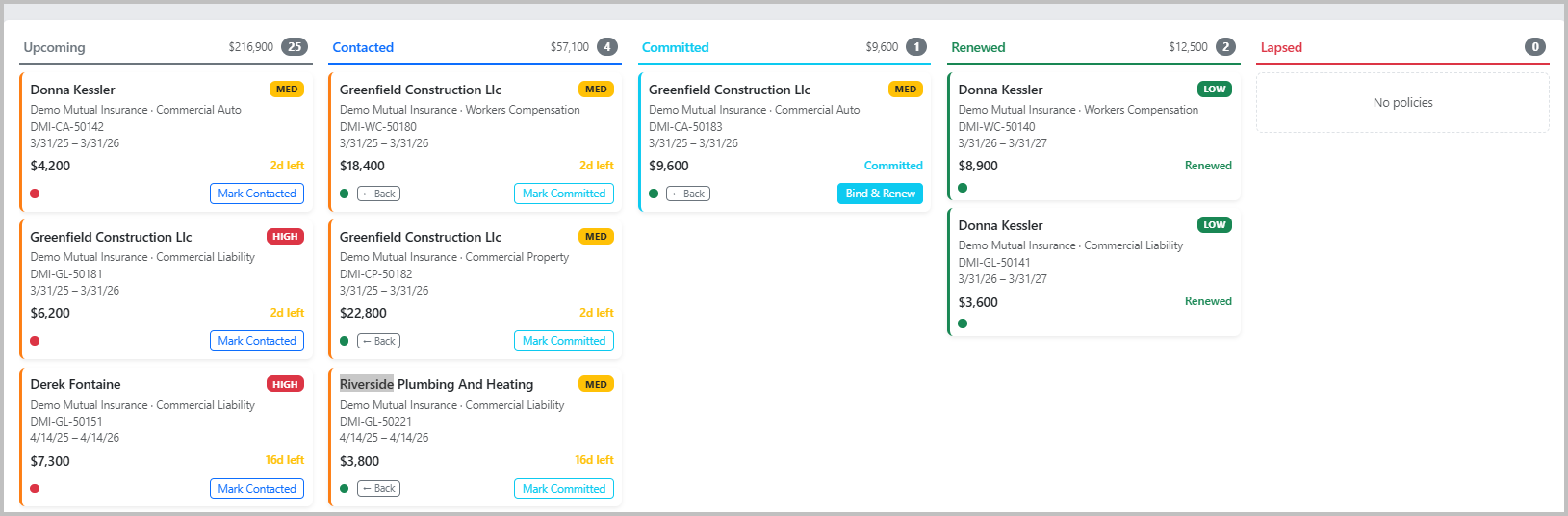
The board covers everything expiring in the next 90 days. Each card shows the client, carrier, line of business, premium, and how many days are left. The colored left border is the urgency signal: red is overdue, orange is within 30 days, yellow is within 60. You can read the whole board in about 10 seconds.
Walking Through the Stages
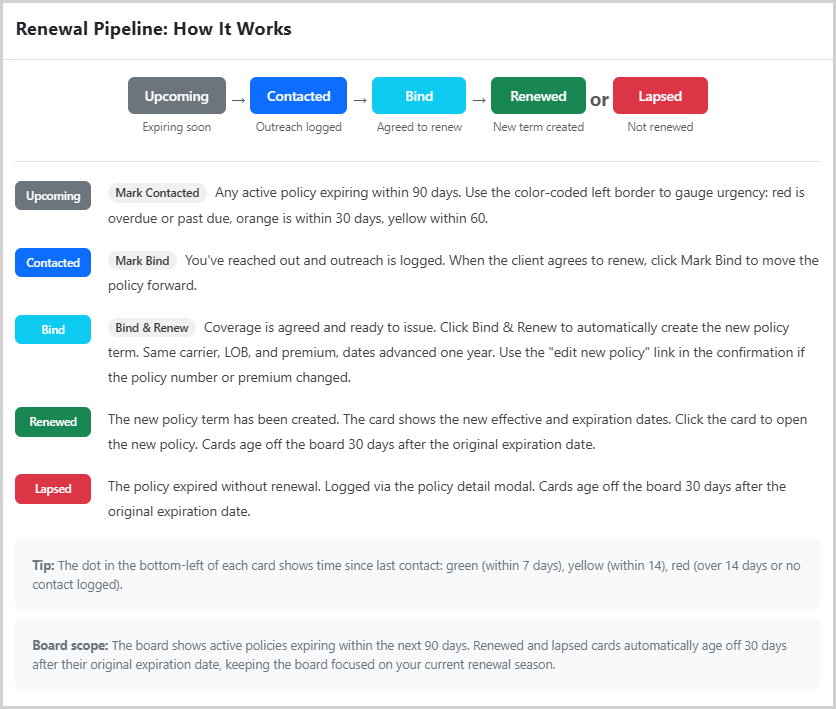
Upcoming is where every expiring policy starts. When you reach out to the client, click Mark Contacted. That logs the outreach and moves the card forward.
Contacted means you have been in touch and the renewal is in motion. When the client agrees to renew, click Mark Committed.
Committed is where it gets good. The client has agreed to renew. Click Bind and Renew and RenewalCompass handles the rest: new policy term created, same carrier, same line of business, same premium, dates advanced one year. The old policy moves to Renewed. One click, done. If the policy number or premium changed, there is a quick-edit link right in the confirmation.
Renewed is the finished pile. The card updates to show the new effective and expiration dates, not the old ones. Click it to open the new policy.
Lapsed is the honest column. If a policy expired without renewal, you log it from the policy detail and it lands here. Renewed and lapsed cards both age off the board 30 days after the original expiration date, so the view stays focused on what is actually in play right now, not last quarter's closed work.
The Contact Dot
The small dot in the lower-left of each card shows how recently contact was logged. Green is within seven days, yellow is within 14, red is over 14 days or nothing on record. On a board with 30 or 40 Upcoming cards, that dot tells you at a glance which accounts have gone quiet and need attention before they become a problem.
Built-in Reference
If someone on the team needs a refresher on how the stages work, the pipeline reference is one click away in the board toolbar. Stage descriptions, what each button does, how the board scope works. No digging around for documentation.
Frequently Asked Questions
What is a renewal pipeline board?
A renewal pipeline board is a visual workflow that shows each policy renewal in a specific stage, such as Upcoming, Contacted, Committed, Renewed, or Lapsed. It gives the whole team a shared view of what needs attention.
Why is a board view useful for insurance renewals?
The board view makes renewal status easy to scan. Instead of opening individual records, producers and CSRs can see what is untouched, what is moving, and what is already done.
What stages should a renewal board include?
Most agencies need stages for upcoming renewals, outreach in progress, client commitment, completed renewals, and lapsed policies. The exact labels can vary, but the workflow should be easy to understand and update.
Also worth reading:
- What Is a Renewal Pipeline and Why Every Independent Agency Needs One
- How Independent Agents Track Policy Renewals (And Why Most Systems Fall Short)
- How Renewal Season Gets Away From You
- How Independent Agents Can Manage 500+ Policy Renewals Without a Full AMS
- AMS Alternatives for Independent Agents Who Just Need Renewal Tracking
RenewalCompass is renewal tracking for independent agents. Your whole book in one pipeline, five stages, no AMS overhead, and no features you will never open.
Get early access and get notified the day subscriptions open. Launching Q3 2026.